
Setup guide
Connect PipsPeakFX to MetaTrader 5
Install the Trade Panel and the PhantomGrid strategies in about five minutes. No license keys — the panel activates by itself.
MetaTrader 5
The desktop app for Windows or Mac (not the mobile app).
An MT5 account
Demo: free on any broker. Real: Vantage, PU Prime or VT Markets under the PipsPeakFX IB.
A PipsPeakFX account
Sign in and verify your MT5 account in the dashboard to unlock the downloads.
Download the bundle
Sign in, open the dashboard and verify your MT5 account once. Then download PipsPeakFX Trade Panel from the Expert Advisors tab.
It is a single .zip file. Unzip it — inside are four files:
- PipsPeakFX_TradePanel — one-click trading, the strategy switches and your trading journal.
- PhantomGrid Gold, BTC and SP500 — the strategies. You never attach them yourself: the panel starts and stops them.
Dashboard → Expert Advisors
Inside the zip
Copy them into MetaTrader 5
- In MetaTrader 5 open File → Open Data Folder.
- Go into
MQL5→Experts. - Paste all four
.ex5files from the zip directly intoExperts(not into a sub-folder). - Back in MetaTrader, right-click Expert Advisors in the Navigator (Ctrl+N) and choose Refresh.
The four tools now appear in the Navigator.
Allow PipsPeakFX to check your license
The license is checked online, so MetaTrader must be allowed to reach our website:
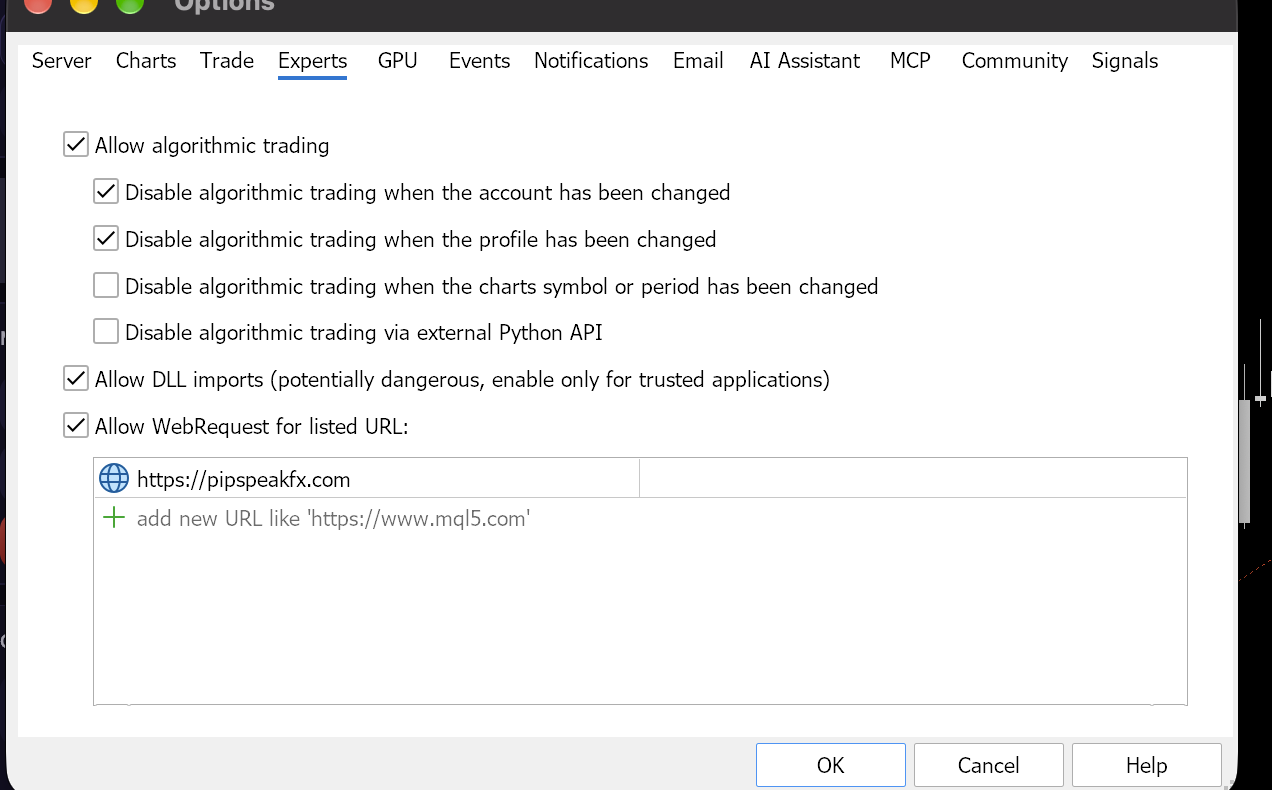
- Open Tools → Options and the Expert Advisors tab.
- Tick Allow algorithmic trading.
- Tick Allow WebRequest for listed URL.
- Click add new URL and type
https://pipspeakfx.com. - Press OK.
Without this step real accounts stay LOCKED. Demo accounts work either way.
Switch Algo Trading on
Click the Algo Trading button in the MetaTrader toolbar so it turns green. Robots cannot place trades while it is red.
Open the Trade Panel
- Open any chart (for example XAUUSD).
- Drag PipsPeakFX_TradePanel from the Navigator onto the chart.
- In the window that opens, on the Common tab tick Allow Algo Trading and press OK.
The panel appears on the chart. The badge at the top shows your license:
- DEMO — demo account, everything is free.
- ACTIVE — real account under the PipsPeakFX IB.
- LOCKED — see the troubleshooting section below.
Move the panel by dragging any empty area, resize it with the dots in the bottom-right corner.
PhantomGrid Gold
● XAUUSD · active
POSITIONS
3
FLOATING
+42.10
DAILY TARGET
off
PhantomGrid BTC
● BTCUSD · off
POSITIONS
0
FLOATING
0.00
DAILY TARGET
off
PhantomGrid SP500
● SP500 · off
POSITIONS
0
FLOATING
0.00
DAILY TARGET
off
Start a strategy
- Open the Strategies tab in the panel.
- Optional: set the Lot, Take profit, pause windows and daily target before starting.
- Press ON. The panel opens the strategy’s chart (XAUUSD, BTCUSD or US500) and starts it for you.
OFF stops new trades at once; trades that are still open keep being managed until they close.
Tip: start with the smallest lot (0.01) on a demo account to see how the strategy behaves before trading real money.
How the license works
| Account | Result |
|---|---|
| Demo or contest, any broker | Always free |
| Real, under the PipsPeakFX IB (Vantage, PU Prime, VT Markets) | Active for life — checked automatically every few minutes |
| Real, not under the PipsPeakFX IB | Locked — closing and managing trades still works |
| Account moved to another IB | Locks within minutes; unlocks by itself when it comes back |
IB codes — Vantage: 9750 · PU Prime: 7525682 · VT Markets: 7448069. The dashboard’s MT5 tab shows the transfer steps for each broker.
Troubleshooting
The panel says LOCKED
https://pipspeakfx.com is in the WebRequest list (step 3), then press Check again in the panel’s Settings tab. On a real account, the account must be under the PipsPeakFX IB — demo accounts are always free.“Allow WebRequest” message
https://pipspeakfx.com exactly like that.I pressed ON but no trades open
MQL5/Experts. The strategy waits for its own trading window and pause times, so it may not open a trade immediately. If the EA could not start, the panel shows a message — the details are in the Experts tab at the bottom of MetaTrader.Real account: “not under the PipsPeakFX IB”
9750, PU Prime 7525682, VT Markets 7448069. After the broker approves the transfer the license turns on by itself within a few minutes — no key, no email needed.Do I need “Allow DLL imports”?
What happens if I switch a strategy OFF?
MetaTrader on a Mac shows “A debugger has been found”
~/Library/Application Support/net.metaquotes.wine.metatrader5 and start MetaTrader again (it rebuilds itself).Still stuck? Message our support on Telegram: @PipsPeakSignalsSupport, or write to us through the contact page.